Synology NTP issue
I encountered issues synching time using a Synology NAS internal NTP service. I used different clients: windows command line, linux command line and cams. I always got sync errors.
Linux example:
~$ ntpdate -q 192.168.200.202
server 192.168.200.202, stratum 16, offset +1.639411, delay 0.02969
20 Dec 07:25:21 ntpdate[189]: no server suitable for synchronization found
The NTP service on Synology was up and running:

I used Wireshark to capture the NTP packets exchanged between my linux client and the Synology NTP server and I found a strange Reference ID: Unidentified Kiss-o’-Death message ‘\x7F’
Network Time Protocol (NTP Version 4, server)
    Flags: 0xe4, Leap Indicator: unknown (clock unsynchronized), Version number: NTP Version 4, Mode: server
    [Request In: 1]
    [Delta Time: 3.790000 milliseconds]
    Peer Clock Stratum: unspecified or invalid (0)
    Peer Polling Interval: 3 (8 seconds)
    Peer Clock Precision: -23 (0,000000119 seconds)
    Root Delay: 0,000000 seconds
    Root Dispersion: 0,000000 seconds
    Reference ID: Unidentified Kiss-o'-Death message '\x7F'
    Reference Timestamp: NULL
    Origin Timestamp: Dec 20, 2025 06:25:21.447938394 UTC
    Receive Timestamp: Dec 20, 2025 06:25:23.089393557 UTC
    Transmit Timestamp: Dec 20, 2025 06:25:23.089471040 UTC
After some checks of the Synology NAS configuration, I found something strange: the synching status of the NAS to the external NTP service, time.google.com, was fixed in “Checking…” status and clicking the Update Now button had no effect.
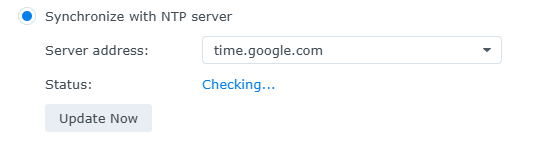
So, I changed the external NTP server to times.windows.com and after few seconds, everything looked fine. I then tried to set back the previous time.google.com and, again, everything loked fine.
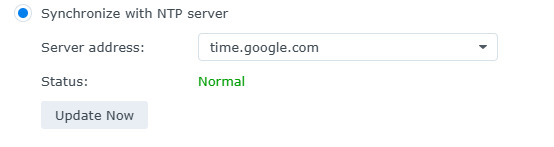
I tried again to sync from my clients and everything worked fine. Perhaps something had hanged in the Synology NTP client service, in charge of getting time information from time.google.com. This issue blocked the internal exposed NAS NTP service. Just my guess…
Looking at the network traffic, now the NTP response contains the original google server IP from which the Synology NAS got the time reference.
~$ ntpdate -q 192.168.200.202
server 192.168.200.202, stratum 2, offset +0.115233, delay 0.02901
20 Dec 07:50:01 ntpdate[193]: adjust time server 192.168.200.202 offset +0.115233 sec
Network Time Protocol (NTP Version 4, server)
    Flags: 0x24, Leap Indicator: no warning, Version number: NTP Version 4, Mode: server
    [Request In: 1]
    [Delta Time: 2.294000 milliseconds]
    Peer Clock Stratum: secondary reference (2)
    Peer Polling Interval: 3 (8 seconds)
    Peer Clock Precision: -23 (0,000000119 seconds)
    Root Delay: 0,036331 seconds
    Root Dispersion: 0,191452 seconds
    Reference ID: 216.239.35.0
    Reference Timestamp: Dec 20, 2025 06:47:37.803898876 UTC
    Origin Timestamp: Dec 20, 2025 06:50:01.819406047 UTC
    Receive Timestamp: Dec 20, 2025 06:50:01.936334908 UTC
    Transmit Timestamp: Dec 20, 2025 06:50:01.936411891 UTC